How to make Portugal's Relatório Único
· 3 min read
Bizisy checks what the Relatório Único needs from 1 January, lists what's missing with a link to fix each, and makes the official XML files for Anexos 0, A, B, C, D, E and F to upload on the platform.

Every employer in Portugal delivers the Relatório Único once a year, for the year before: who worked there, who joined and left, training, health and safety, and the service providers it used. Bizisy prepares it from what it already knows and asks only for the rest.
1. See what's missing
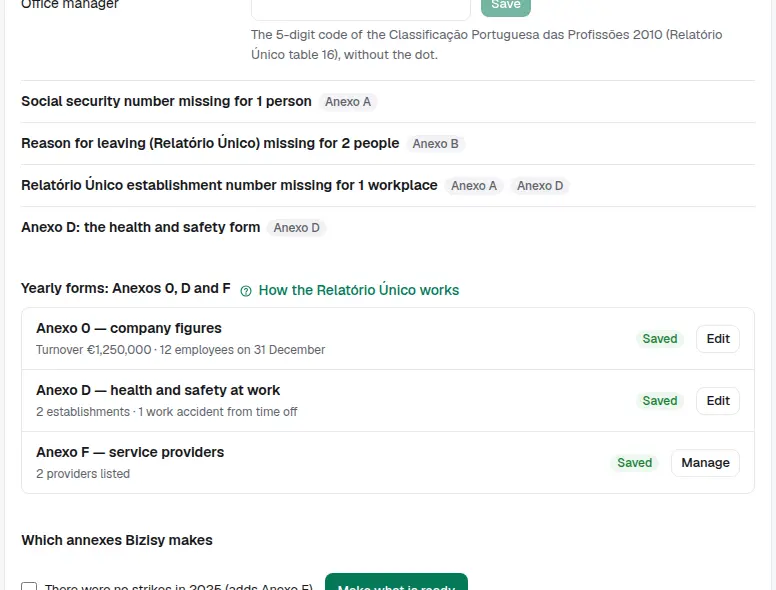
Open Integrations → Country obligations → Reports. From 1 January, each Portuguese legal entity has a card for last year's report, with the legal window and what's missing, grouped: a job title without a profession code, a leaver without the reason they left, an establishment without its number. Each line has a field to fill in on the spot or a link to where it's fixed.
2. Fill in the yearly forms
Under Yearly forms, three short forms cover what Bizisy can't know from its records:
- Anexo 0 — company figures: the year's turnover, how many people were union members on 31 October, workers posted abroad, the employer associations you belong to, whether overtime was worked, and the share capital. Bizisy adds the headcounts on 31 December and the year's average. With 10 or more people on 31 October you can add the accounts' figures too.
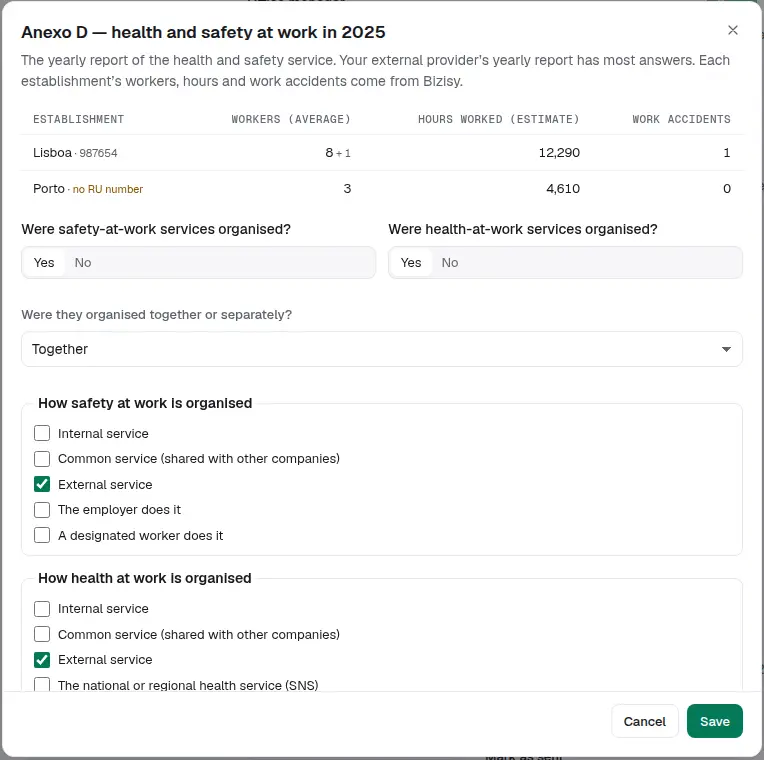
- Anexo D — health and safety at work: whether safety and health services were organised and how (internal, common, external), the doctors and technicians, and yes or no on programmes, audits, risk factors and exams. Bizisy fills in each establishment's average workers, an estimate of the hours worked, and the work accidents and days lost, counted from time off.
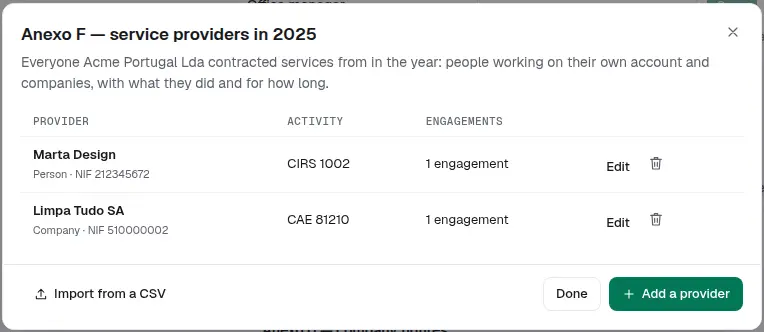
- Anexo F — service providers: everyone you contracted services from, with their NIF, NISS, activity and when they worked for you. Add them one by one or import a CSV (Bizisy checks every row first, as the platform does, and imports nothing until all are right). No providers? Tick that there were none.
3. Count work accidents from time off
So Anexo D counts work accidents, mark the leave type you book them with: Settings → Time off → Leave types, edit it and tick Leave for a work accident. Bizisy then counts each absence as an accident, by how many days were lost, and the days lost this year from accidents of earlier years. Only counts go into the report. If you had no accidents and don't use such a type, tick There were no work accidents in the Anexo D form.
4. Make and upload the files
When nothing is missing, choose Make the files. Bizisy makes one XML file per annex in the official format, checked against the official schemas: Anexos 0, A, B, D and F, Anexo C with Training on, and Anexo E when you confirm there were no strikes. Download them, upload them in the Relatório Único platform (Launcher), and mark the report as sent.
Tips
- Where you answer Yes in Anexo D (risk agents, exams, actions, diseases), and for Anexo 0's sections on workers with a disability and unworked hours, the platform asks for the details after you upload: add them there.
- The hours worked in Anexo D are an estimate from weekly hours, less vacation, public holidays and accident days. Enter the real hours per establishment if you have them.
- Who can do what: owners, admins and HR do everything. A role with Payroll at View (such as an accounting firm's) can check what's missing and read the forms; filling the forms and the providers list takes Payroll at Edit, and making the files also takes access to Private details and Pay (they hold social security numbers and October's pay).
- A large providers list imports in rounds of 200: Bizisy keeps going on its own and shows how many are left; if it stops, import the same file again and it carries on where it stopped.
- The Relatório Único only knows men and women. For someone whose sex in Bizisy is another or not disclosed, the missing list asks for the sex registered with Segurança Social; it's used only in the files.
- The files are made in the app only: they hold people's social security numbers. Your AI app can tell you what's missing, but the forms are filled here.